Your Car Setup
After every session, this tab tells you which setup changes to make, in what order, and why, worked out from your own laps for the way you drive. The next time you load a session at the same track, it checks whether each change did its job.
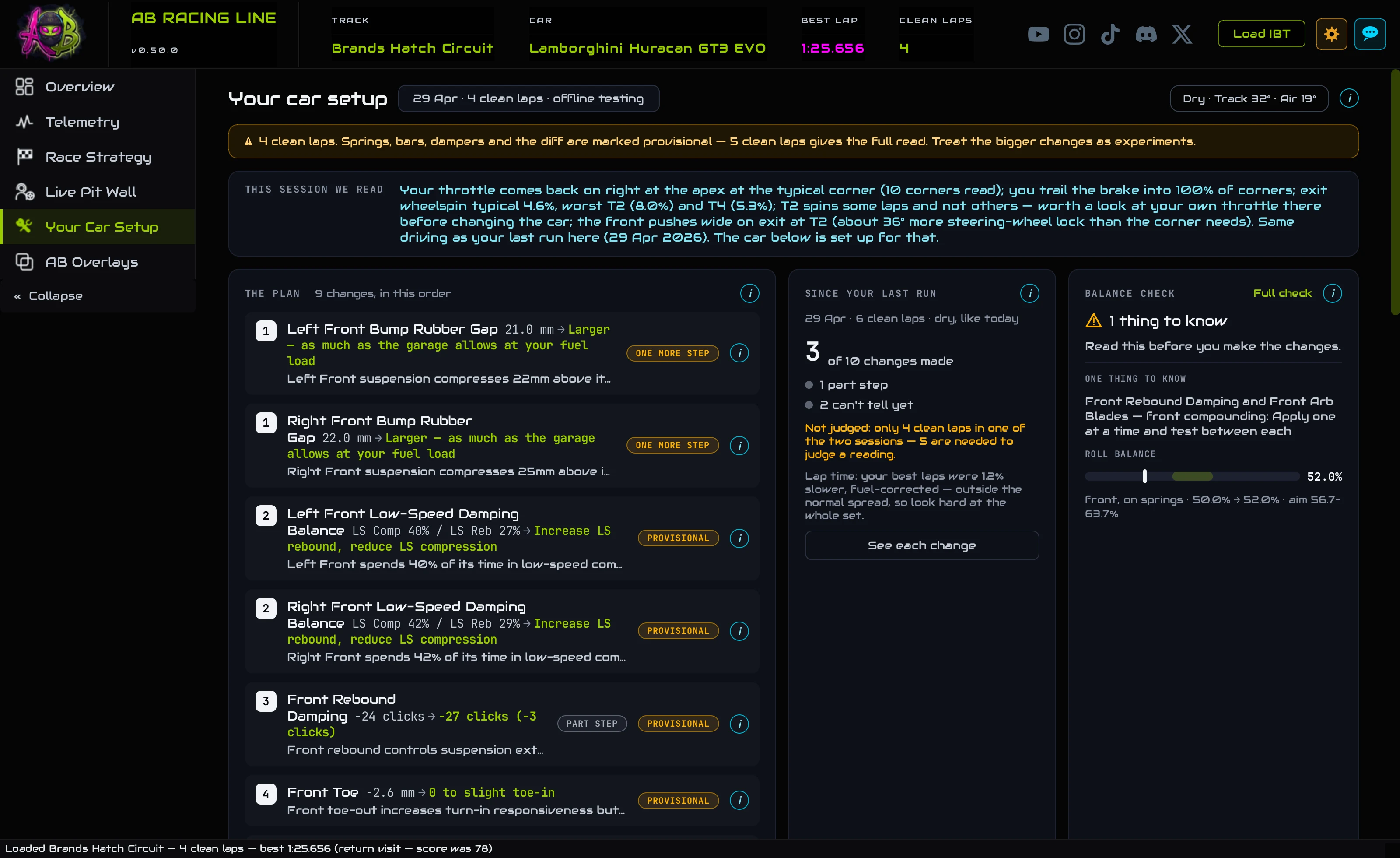
- Load a session and open Your Car Setup.
- Read The plan: the changes, numbered in the order to make them. Start with 1.
- Make them in iRacing's garage. Each one is marked on its row in The garage, laid out like iRacing's, so it's easy to find.
- Drive the same track again and load that session. Since your last run tells you what each change did.
OverviewThe page at a glance
Everything on this page is about the car, read from the session you loaded. Here's the whole page from top to bottom; the numbers match the list beside it.
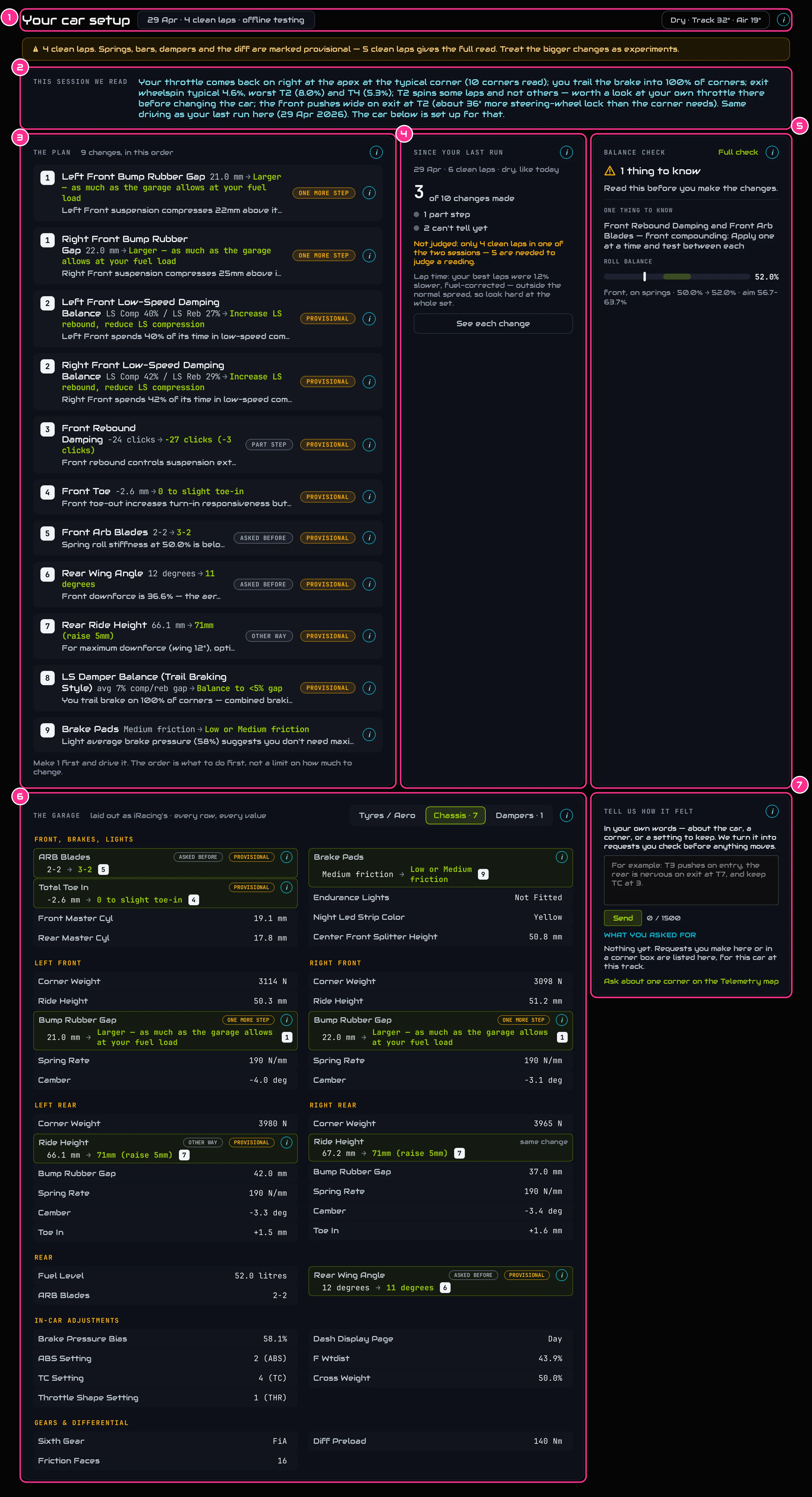
- 1The headerThe day you drove, how many clean laps the session had and what kind of session it was. On the right: dry or wet, and the track and air temperature.
- 2This session we readWhat we measured about your driving and the car: where your throttle comes back on, how much you trail the brake, which corners spin the wheels or run wide on the way out. Everything below is set up for that.
- 3The planThe changes to make, numbered in the order to make them.
- 4Since your last runWhat the changes from your last run here did.
- 5Balance checkWhether the changes work together as a set.
- 6The garageEvery setting on the car, laid out like iRacing's garage, with each change marked on its row.
- 7Tell us how it feltHow the car felt, in your own words, turned into requests the setup follows.
Step by stepAfter a session
Load the session and open Your Car Setup
Drive your session in iRacing, then load it: press Load IBT at the top right of the app and pick the session's file, or drag the file onto the window (Getting started shows where iRacing saves it). Then click Your Car Setup in the menu on the left.
Read what we measured
The strip under the header, This session we read, says in a line or two what the session showed: where your throttle comes back on, how often you trail the brake into a corner, which corners spin the rear wheels or push wide on the way out, and whether you drove differently from your last run here. The changes below are chosen for that, so read it first.
Read the plan, starting at 1
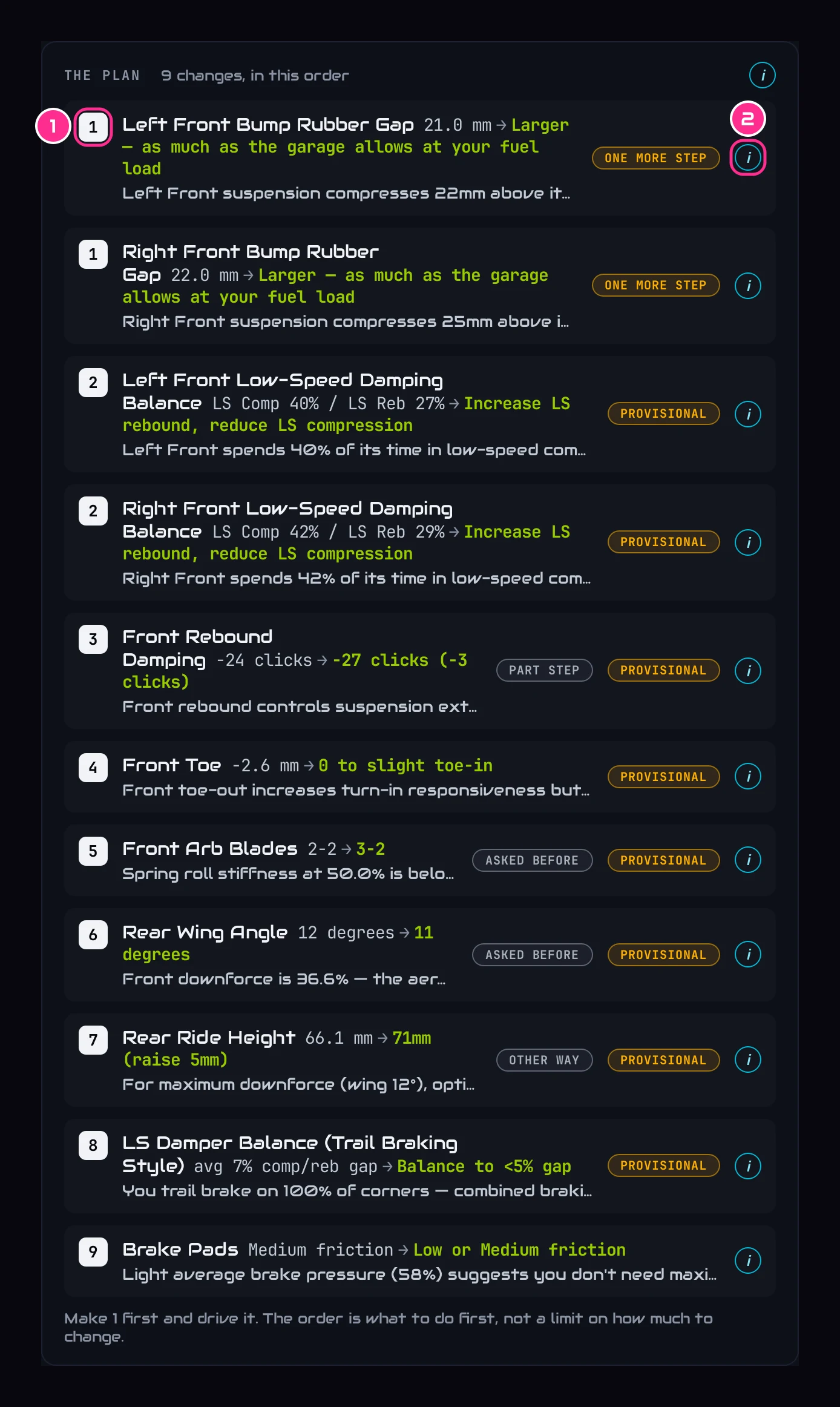
- 1The orderMake the changes in this order. Changes that share a number belong together: make them as one. Here, the bump rubber gap on both front corners is change 1.
- 2The iOpens the full reason for that change (see Why a change).
Each line shows the setting, the value you drove on, an arrow, and what to change it to. The grey line under it is the start of the reason. The small marks beside a change say more about it, like ONE MORE STEP or ASKED BEFORE; they're all in What the marks mean. A change marked AFTER … waits for another change that does the same job more directly: make that one first, and come back to it only if the problem is still there.
Find each change in the garage
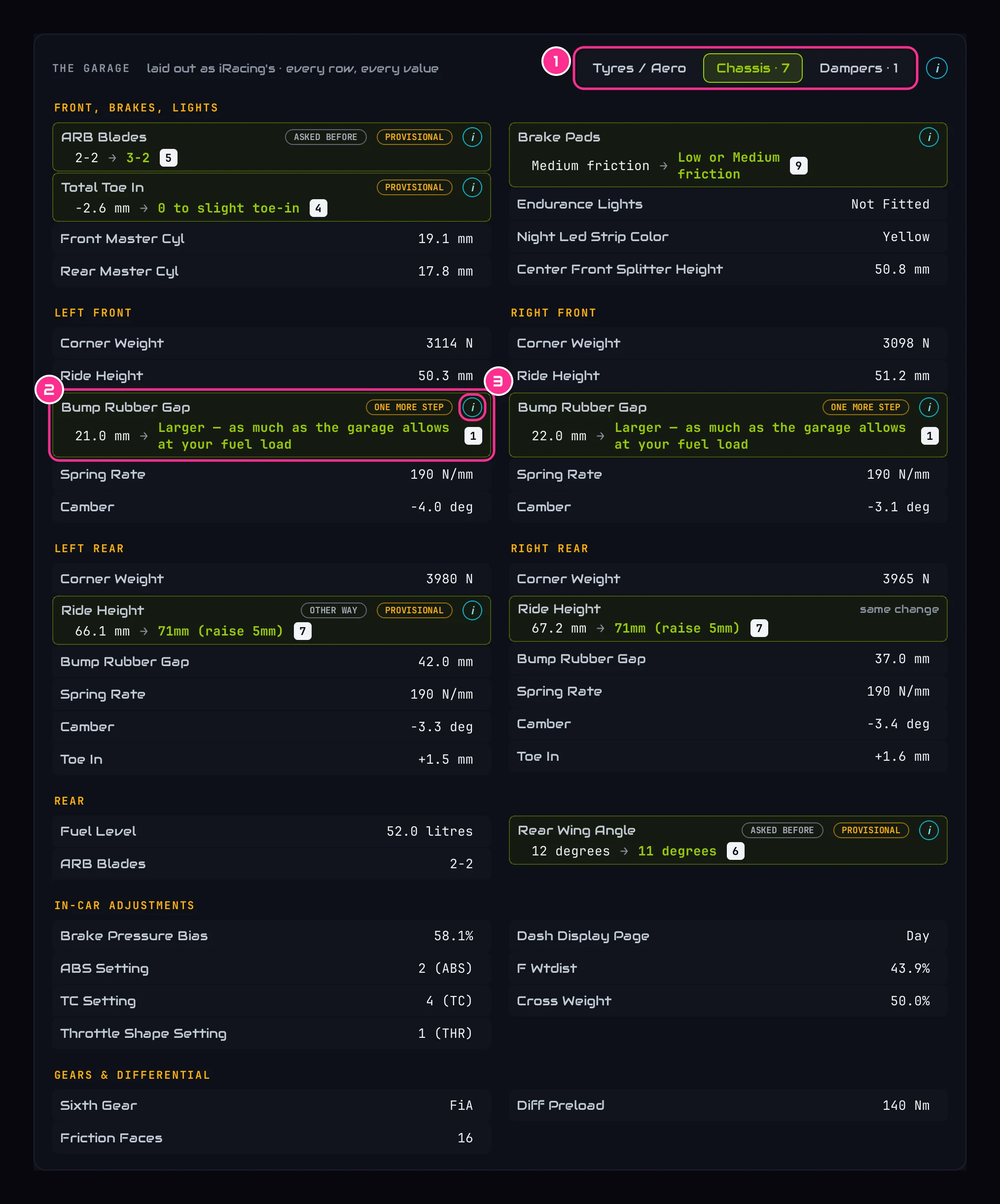
- 1The tabsThe same tabs as iRacing's garage. A tab shows how many changes it holds, like Chassis · 7.
- 2A changed rowLit green, with the new value and its number in the plan. Its partner on the other side of the car says same change.
- 3The iThe same reason as in the plan.
Click a change in the plan and the page jumps to it in The garage, which is laid out like iRacing's own garage: the same tabs, the same names, in the same order. Every row without a mark is a setting nothing was asked of.
Make the changes in iRacing, then drive
In iRacing's garage, find each setting on the same tab and set the new value, starting with 1. When a change says something like Larger, as much as the garage allows at your fuel load, iRacing's garage sets the limit: go as far as it lets you. Then drive the same track again.
Load the new session and see what worked
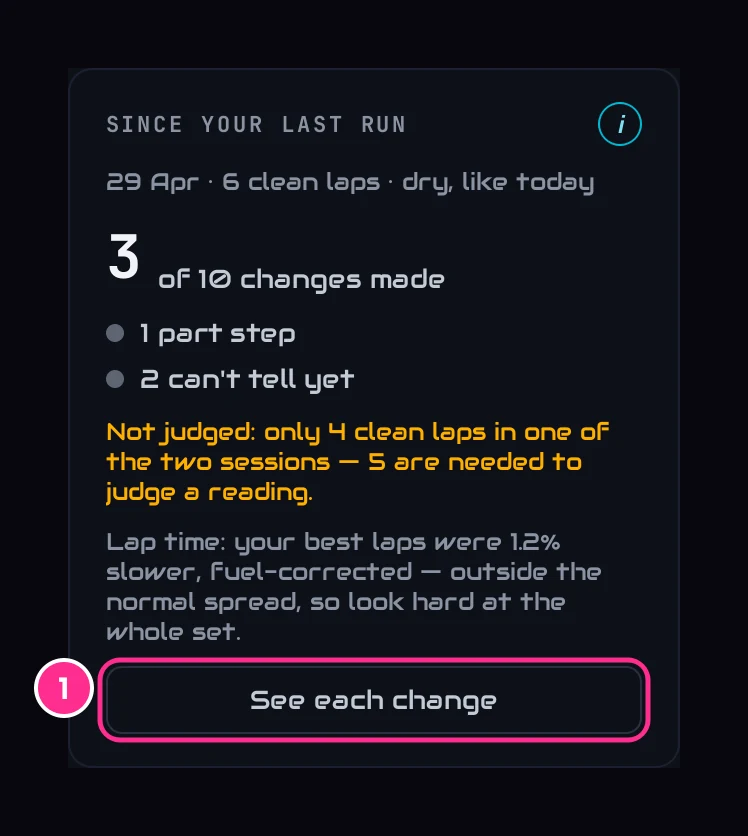
- 1See each changeEvery change from last time, one by one: whether you made it, and what its reading did.
Load the new session's file. Since your last run now checks every change you were given last time: how many you made, and for each one whether the thing it was aimed at moved. The next plan follows from that. There's more in Since your last run.
The i on a changeWhy a change, and keeping a setting
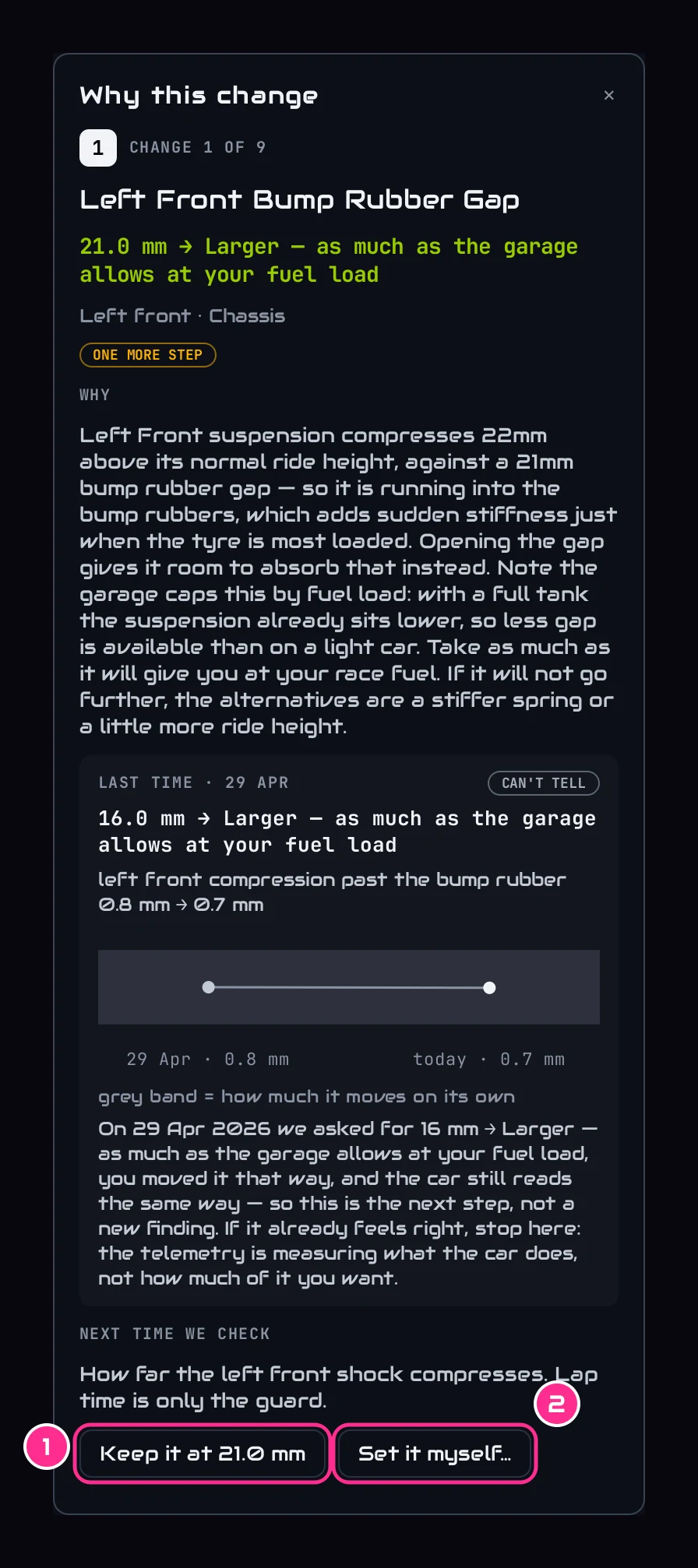
The i on any change opens Why this change on the right of the page. From top to bottom:
- The change: its place in the plan, the setting, and the value to change it to.
- Why: what we measured, and why this change helps. Where the car's own setup notes say what going this way costs, that's quoted too.
- Last time: if we asked for this setting before, what we asked for, what you did, and what the reading did since. The grey band is how much that reading moves on its own between two sessions: a change only counts when it moves by more than that.
- Next time we check: what the next session will judge this change on. Lap time is only a guard.
- 1Keep it at …Holds the setting where it is. The plan works around it, and the i still says what the data would have done.
- 2Set it myself…Type your own value. The plan uses it, and says whether the data agrees, would stop short or go further.
Changed your mind? Everything you've kept or set is listed under Tell us how it felt, in What you asked for. Press × on a line to remove it.
Did it work?Since your last run
Load a session at a car and track you've driven before, and Since your last run checks the changes you were given last time.
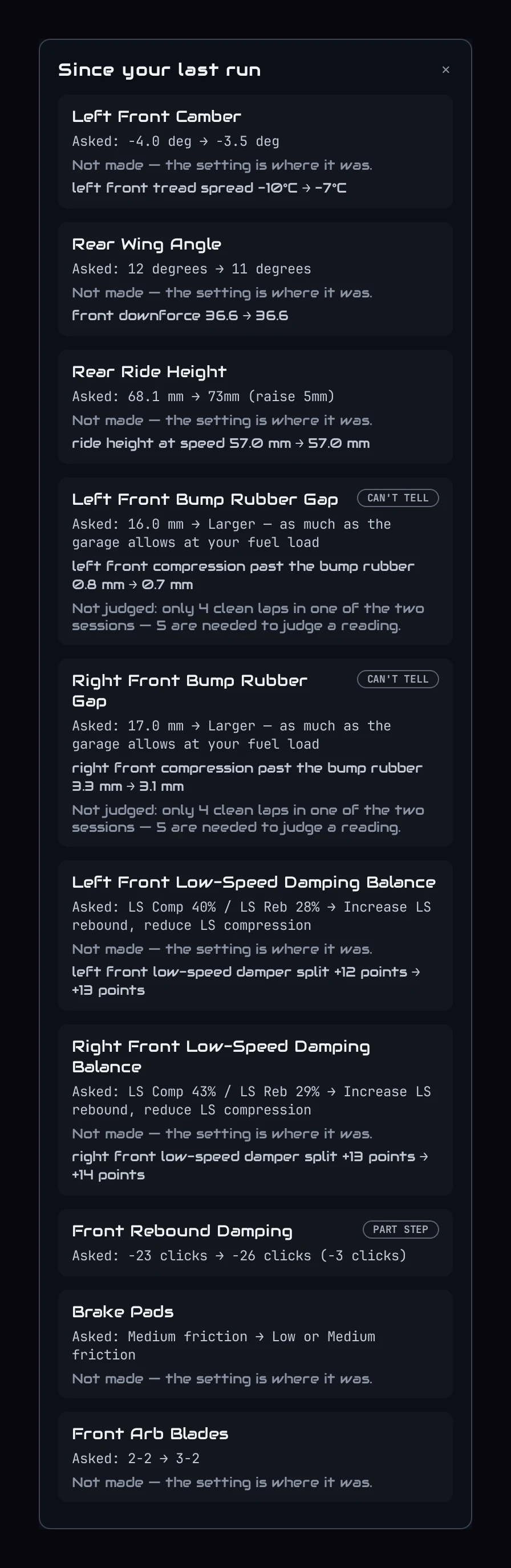
- Which changes you made. The app compares the two setups, so it knows which changes you actually made, and which only part of the way.
- What each one did. Every change is judged on the reading it was aimed at, like the wheelspin out of one corner or the temperature across one tyre, never on lap time. A reading moves on its own between two sessions, so a change only counts when it moved by more than that.
- Lap time is a guard. If your best laps were clearly slower, fuel-corrected, the card says so and asks you to look hard at the whole set. One change can't be judged on the stopwatch.
The dots count what happened, from WORKED to CAN'T TELL, and each result sets the next step in the plan. A change that worked is left alone. One that moved too little gets one more step; two steps that do nothing and we stop asking. One that made things worse is put back, and that setting is skipped for that problem until you take it off the list under What you asked for.
Better, same or worseWhen we ask you: did it help?
Some things can't be measured well enough between two sessions yet. For those, the changed row in the garage asks you how the car felt after the change, with Better, Same and Worse.
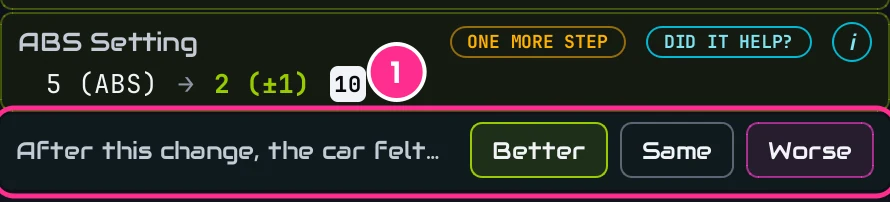
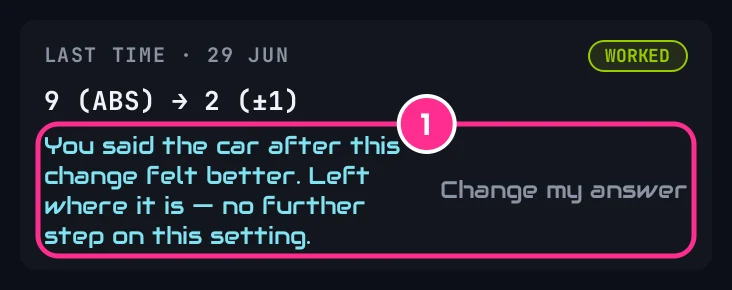
Your answer decides the next step. Better keeps the change. Same takes one more step. Worse puts it back, and that setting is skipped for that problem until you take it off the list. The same question also appears in the Corner coaching panel on the Telemetry tab, at the corner the change was aimed at: answer in either place and the other shows the same answer.
The changes as a setBalance check
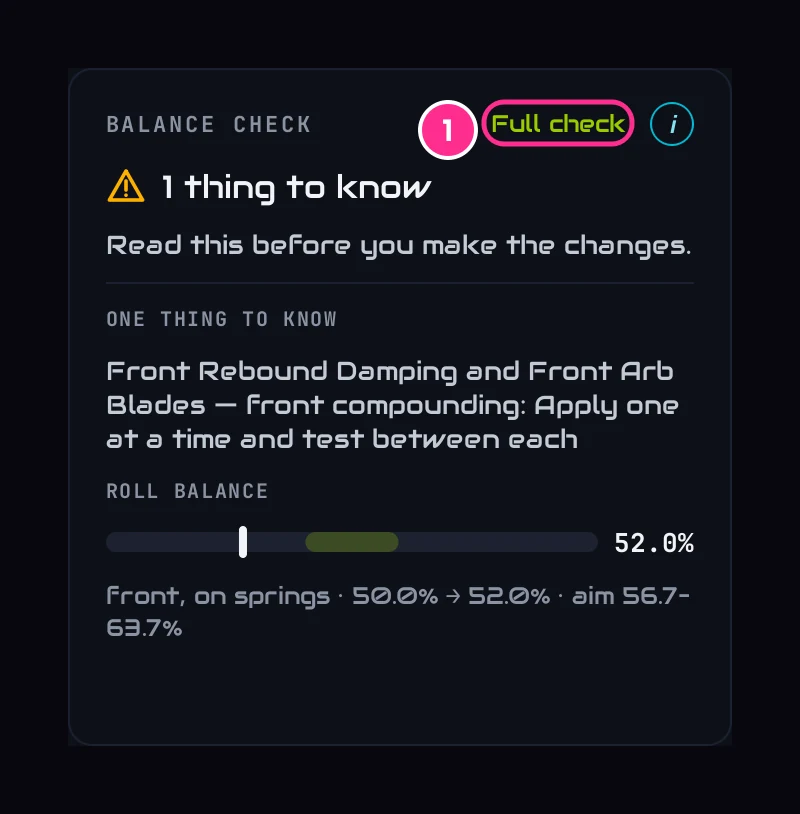
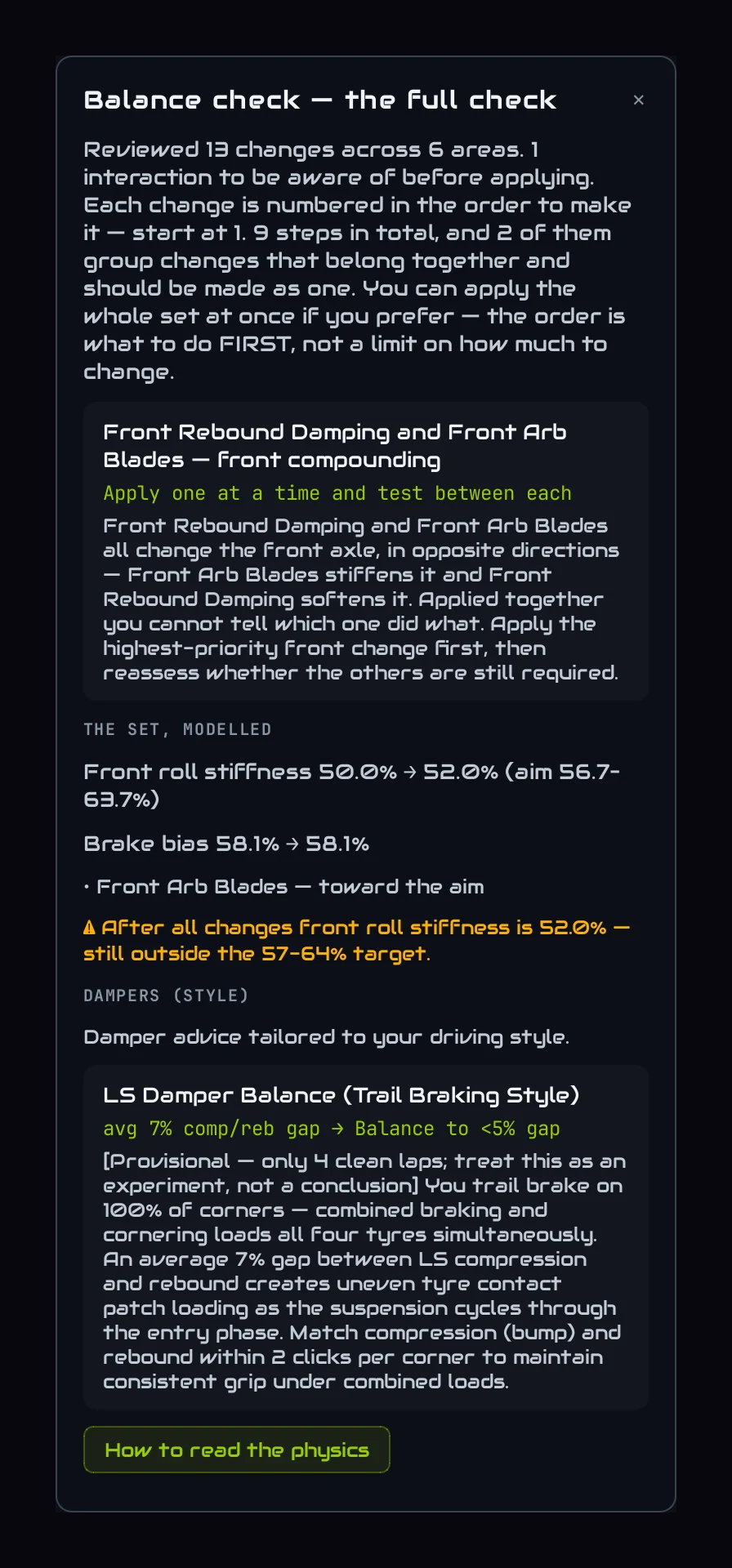
Balance check looks at all the changes together: whether any two pull the car opposite ways, and the order that stops one hiding what the other does. It either says They work as a set, or lists the things to know before you start. In this session it's one: two front changes that pull opposite ways, so make one, drive, then the other.
Roll balance is the share of the car's roll stiffness carried at the front, worked out from the spring rates. The white mark and the number show where the changes take it, and the green band is where we aim, adjusted for the way you drive.
- 1Full checkEvery number behind the check, in a panel on the right.
Your own wordsTell us how it felt
The data sees a lot, but you're the one in the car. Tell the app how the car felt, in your own words, and the setup follows. There's a full walkthrough in the tutorial Tell the app how the car felt; here's the short version.
Type it, and press Send
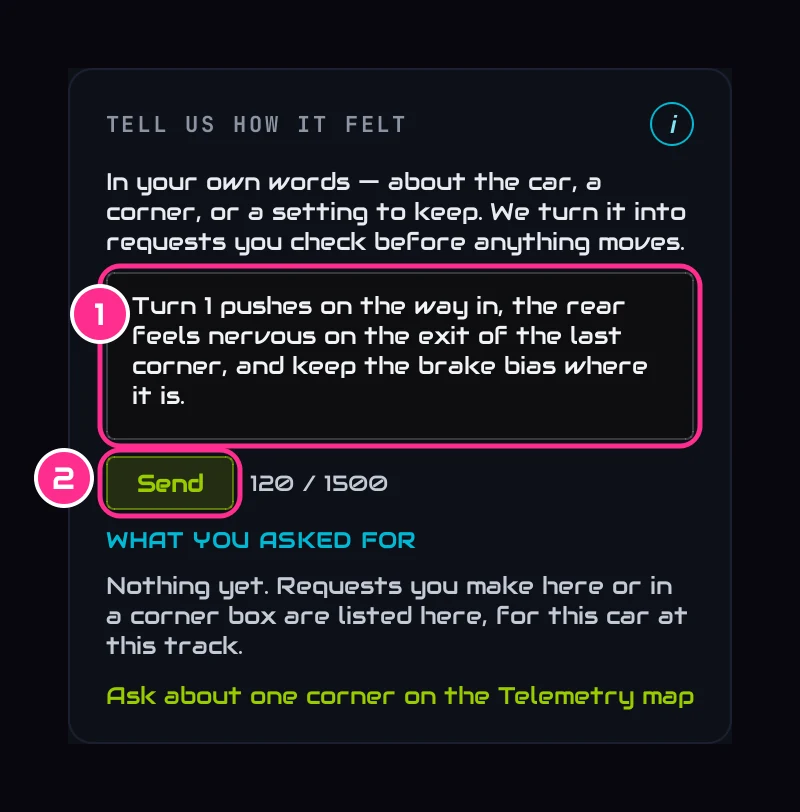
- 1Your wordsOne corner, several, the whole car, or a setting you want kept. Here: Turn 1 pushes on the way in, the rear feels nervous on the exit of the last corner, and keep the brake bias where it is.
- 2SendReads your words. Nothing is saved yet.
Check what we understood, then Apply
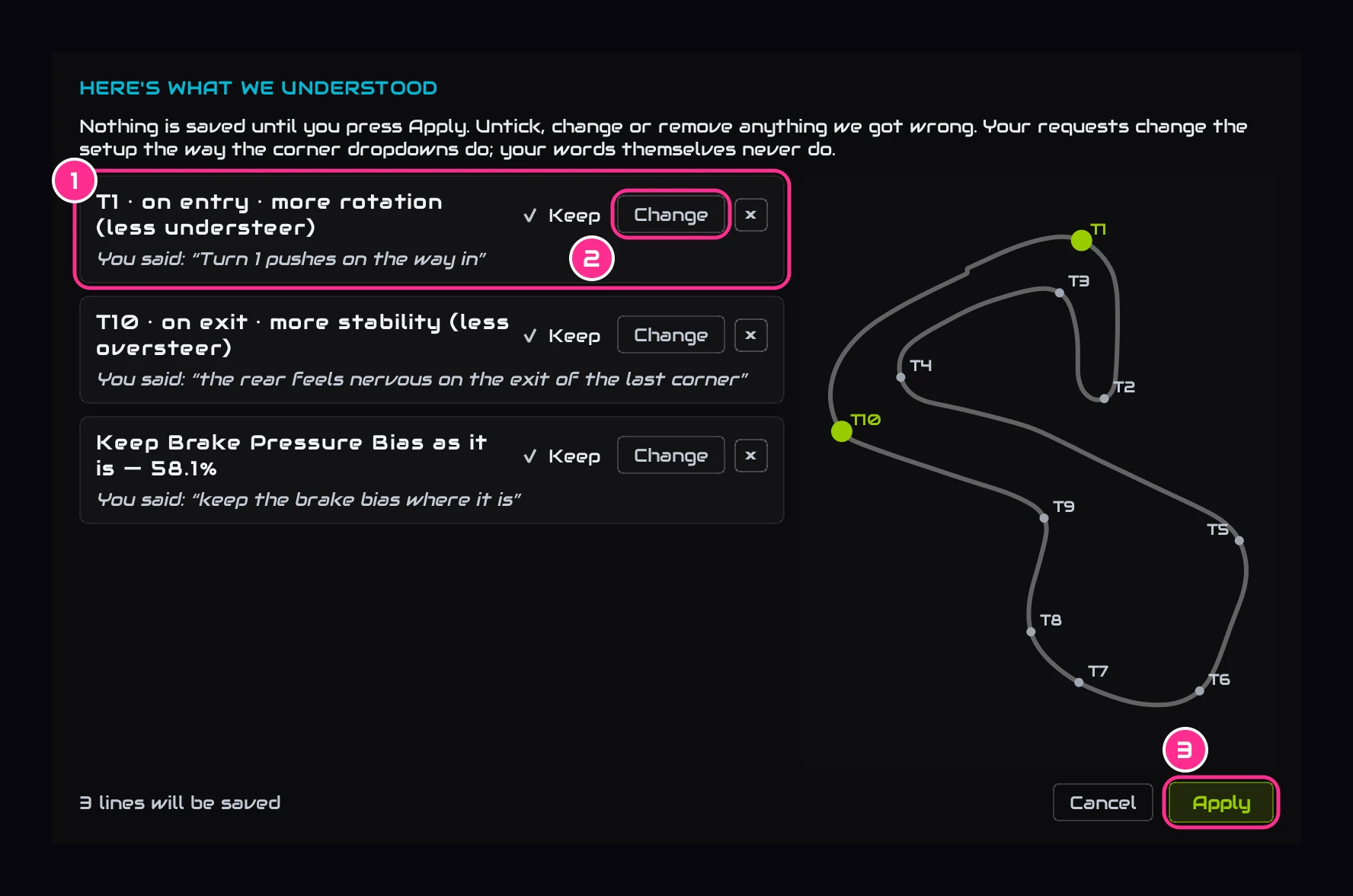
- 1One line per requestWhich corner, which part of it, and what you want more of, with your own words under it. The corners light up on the map.
- 2ChangeFix a line we got wrong. Untick Keep or press × to drop it.
- 3ApplySaves what you kept. Nothing is saved until you press it.
See what it did
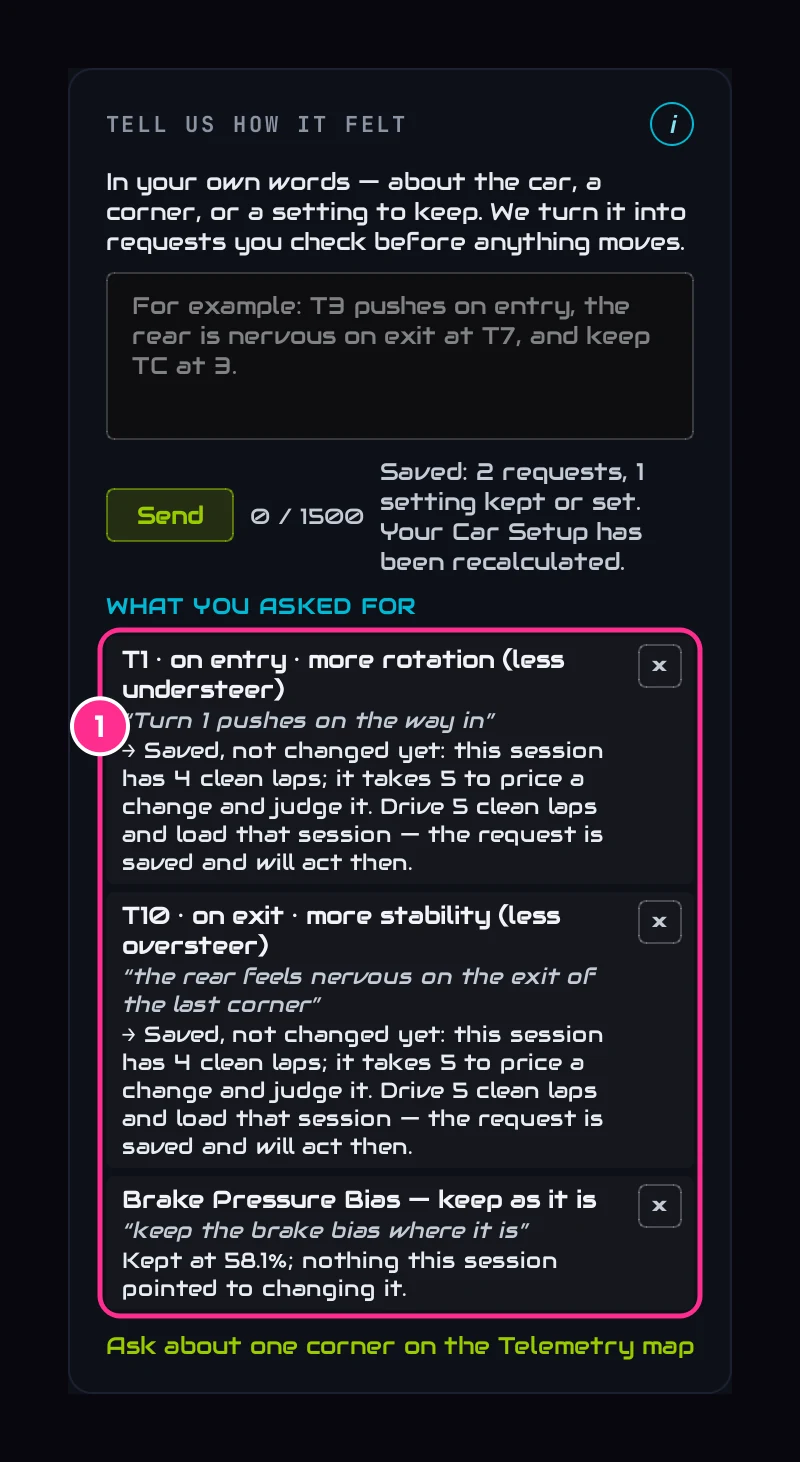
- 1What you asked forEvery request at this car and track, with what it changed this session, or why nothing changed yet. Press × to remove one.
The setup is worked out again straight away. A change made for one of your requests is marked FOR YOUR T1 ASK in the plan. A request needs a session with 5 clean laps to act: on a shorter one, like this four-lap session, it's saved and acts the next time.
A goal for the whole carWhen nothing needs changing
Sometimes a session's data asks for no change at all. The plan then asks What would you like more of? with three picks: More turn mid-corner, More drive out of the corners and More stability on entry. Pick one and the app makes one change for the whole lap, marked FOR YOUR GOAL. Drive it, and your next session here says whether it helped. Click a picked goal again to take it back.
How many lapsShort sessions
The app needs 2 clean laps to analyse a session. The more you give it, the more it trusts what it reads:
- 5 or more clean laps: the full read.
- 3 or 4: springs, bars, dampers and the diff are marked PROVISIONAL. Treat the bigger changes as experiments.
- Fewer than 3: spring, bar, damper, diff, ride-height and brake-bias changes are held back.
Your requests, and the check on last time's changes, both need 5 clean laps too.
RainWet sessions
Drive in the wet and the page gives you a wet setup: a starting setup for the rain, built for the way you drive in it, and made as one package rather than in an order. Where a number can be worked out honestly (ABS, the wing, brake bias, your measured pressures) it's given; the rest show which way to go and a careful first step, to tune by feel. A session that ran both slicks and wets gets a DRY | WET switch at the top, to see each setup.
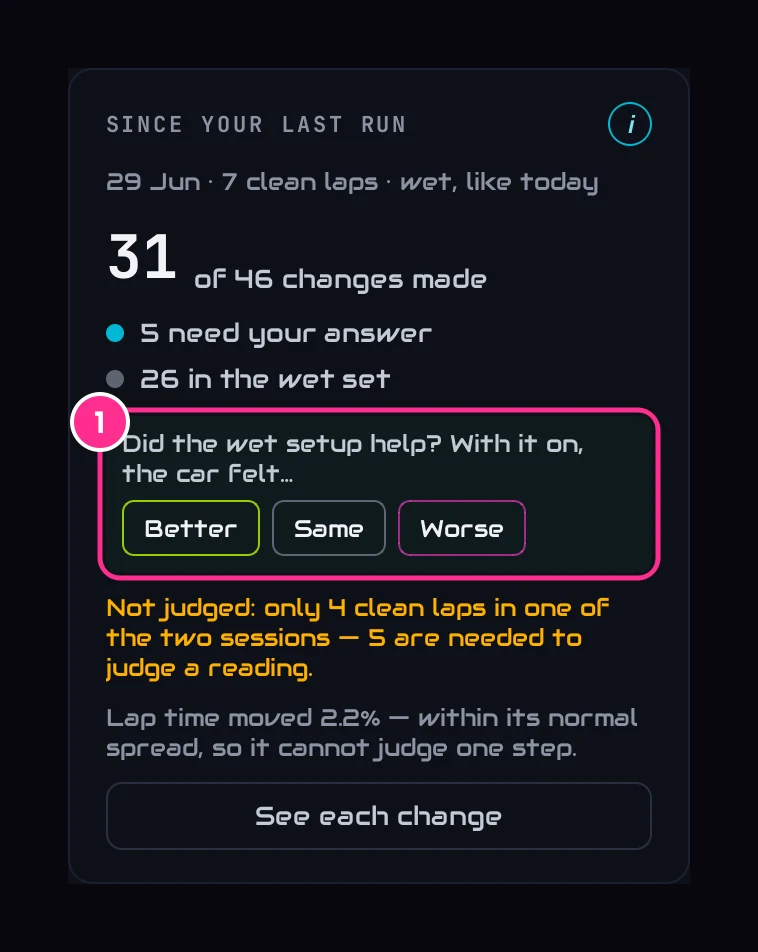
After your next wet run, Since your last run asks once: Did the wet setup help? The set was made together, so it's judged as one. Better keeps it. Same takes one more step at the end of the car the wet laps point to. Worse puts the springs, dampers and bars back to their dry values. A wet set that's already on the car isn't softened again.
- 1One questionfor the whole wet set.
EnduranceRaces with pit stops
Load a session with pit stops and a dropdown appears beside the header. The first entry, Whole race, is the default and is the setup to run. Pick one stint instead to see what that stint alone showed, which helps when one stint felt different from the rest. The check on last time's changes is made on the whole race, not one stint.
ReferenceWhat the marks mean
A mark on a change, or on its row in the garage, says where it stands. Click a mark, or the i, for the detail.
- PROVISIONALRead from fewer than five clean laps. Treat it as an experiment.
- AFTER …Waiting its turn: another change does the same job more directly. Make that first; come back only if the problem is still there.
- FOR YOUR … ASKMade because you asked about a corner: one step, with what it costs the other corners.
- FOR YOUR GOALMade for a goal you picked for the whole car.
- HELD · YOUR CALLYou asked us to keep it. The i still says what the data would have done.
- SET BY YOUYour number, and whether the data agrees, would stop short or go further.
- WORKEDThe reading it aimed at moved the way we wanted, by more than it moves on its own. Leave it.
- HELPEDIt moved the right way, and the problem is now small enough that nothing more is asked.
- ONE MORE STEPIt moved less than it moves on its own, or the right way but not far enough yet. One more step; two that do nothing and we stop.
- GO BACKIt moved the reading the wrong way. The new value puts it back.
- WENT PASTIt went past the target and out the other side. This takes it part of the way back.
- NOT ITFull steps and the reading didn't move. We stop asking: the cause is somewhere else.
- DID IT HELP?We can't measure this one well enough yet. Your Better, Same or Worse decides it.
- WET SETPart of the wet setup, made together as one set, so it's judged as one, by your one answer.
- CAN'T TELLToo few laps, or wet against dry. We don't guess: it's judged next time.
- MIXEDBetter in one place and worse in another. No further step: judge it on how the car feels.
- ASKED BEFOREAsked last time and not made. Still asked, for the same reason.
- PART STEPYou moved it part of the way. Not judged: a part step isn't the step we asked for.
- OTHER WAYYou moved it the opposite way to what we asked. If it felt better, trust that over this card.
- UNDOES LASTThis steps back toward where you started. Judge how the car felt after the first change before undoing it.
- OPPOSITEToday reads the other way on a setting that hasn't moved, so one of the two sessions is the odd one out.